Normalized Categories: One Filter for 'Polos' Across Every Supplier
If you’ve ever tried to search “polos under $10 in navy” across more than one supplier, you already know the punchline. SanMar files them under one label, S&S Activewear under another, Hit Promotional under a third, and a long tail of suppliers keep their own taxonomy of taxonomies: Polos, Knits, Apparel > Tops > Sport Shirts, POLO/SPORT, Performance Polos, you get the idea. Same garment, twelve different category strings.
We just shipped a fix: a single curated category tree, an AI classifier that fills it in, and a real normalized_category_id filter on the API. PSRESTful Product Search and PromoSync Product Search both use it as of today.
The Problem
PromoStandards never standardized categories. The Product Data service hands back whatever the supplier decides to put in ProductCategory and ProductSubcategory, and every supplier decides differently. That’s fine for browsing one supplier. It falls apart the moment you try to search across all of them.
Concretely, when a sales rep is on the phone and asks “what polos do we have under $10 in navy that ship from the East Coast?”, the honest answer used to be “give me a few minutes.” You’d run the search per supplier, mentally translate each supplier’s category labels, and stitch the results back together.
We wanted a single dropdown that says Polos and means it.
A Curated Two-Level Taxonomy
The taxonomy lives in psrestfuldjango as a YAML fixture and a pair of models (NormalizedCategory and NormalizedSubcategory), plus a nullable normalized_subcategory_id foreign key on Product. Eleven top-level categories, ~50 subcategories, deliberately small:
- Apparel: T-Shirts, Polos, Crewnecks, Hoodies, Fleece, 1/4 Zip, 1/2 Zip, Jackets, Vests, Pants, Shorts, Activewear, Scarves
- Headwear: Caps, Beanies, Visors, Bucket Hats
- Bags: Backpacks, Totes, Duffels, Coolers, Drawstrings
- Drinkware: Tumblers, Mugs, Water Bottles, Stemware
- Tech: Power Banks, Chargers, Audio, Cables & Adapters, Phone Accessories, Projectors
- Office & Writing: Pens, Notebooks, Desk Accessories, Calendars
- Outdoor & Lifestyle: Blankets, Umbrellas, Camping, Towels, Sunglasses
- Novelties: Stress Relievers, Fidget Toys, Plush Toys
- Awards & Recognition: Trophies, Plaques, Crystal, Medals, Ribbons, Globes
- Trade Show & Signage: Banners, Flags, Pennants, Table Covers, Signage
- Personal Care: Hand Sanitizer, Sunscreen, Lip Balm, Masks
Two design choices worth calling out:
- Two levels, not five. Distributors don’t navigate ten-level decision trees on the phone. Category → Subcategory is the deepest you ever need to go for a search filter.
- Slugs are the contract, names are not. Each category and subcategory has a stable
slug(polos,power-banks) and an admin-editablename. The filter API takes ids; URLs and prompts use slugs. Renaming “Tech” to “Electronics” tomorrow doesn’t break anything downstream.
Classifying Existing Products with LLMs
Curating a tree is the easy part. We had hundreds of thousands of existing products to classify, and “go through them by hand” was never on the table.
So we built an LLM-backed classifier. For each product, the model returns a single best subcategory along with a confidence score and a one-line reasoning. The classifier is pluggable: we run it against a hosted model in production, and against a local model via Ollama for backfills and for environments without API access. Same input, same output shape, swap the backend.
API: GET /extra/v2/normalized-categories
The taxonomy is exposed as a first-class endpoint on the PSRESTful API. The whole tree fits in one paginated response, with categories and their active subcategories nested inline:
curl 'https://api.psrestful.com/extra/v2/normalized-categories?is_active=true' \
  -H 'x-api-key: YOUR_KEY' \
  -H 'accept: application/json'
{
"count": 11, "page": 1, "page_size": 50, "total_pages": 1,
"next": null, "previous": null,
"results": [
{
"id": 1, "name": "Apparel", "slug": "apparel",
"sort_order": 0, "is_active": true,
"subcategories": [
{"id": 10, "name": "T-Shirts", "slug": "t-shirts",
"sort_order": 0, "is_active": true},
{"id": 11, "name": "Polos", "slug": "polos",
"sort_order": 1, "is_active": true}
]
}
]
}Two things to notice:
- One call, full subtree. The taxonomy is small enough that we deliberately denormalize the response. No second
?parent=call to flesh out the children. is_active=truefilters both levels. It returns only active categories and drops inactive subcategories from eachsubcategoriesarray. So a “soft delete” of a subcategory propagates cleanly to clients without breaking the filter the next time around.
This is not the existing GET /extra/v2/categories endpoint, which still returns the raw, supplier-specific category strings. The two coexist on purpose. Supplier categories are still useful for supplier-scoped browsing, and the normalized taxonomy is the cross-supplier one.
Filtering Products
Two new query params on GET /extra/v2/products:
GET /extra/v2/products?normalized_subcategory_id=11      # Polos, exact match
GET /extra/v2/products?normalized_category_id=1          # anything under Apparel
GET /extra/v2/products?normalized_category_id=1&normalized_subcategory_id=11
                                                         # subcategory wins
The normalized_category_id filter is implemented as a SQLAlchemy subquery that expands to “subcategories whose parent is this category id,” then filters products against that set. So a single category id matches every leaf under it without the client having to expand the tree itself. When both are passed, the more specific id wins; this matches how cascading dropdowns send their state and means clients don’t have to clear the parent when the child changes.
Each product in the response now also carries a normalized_subcategory block when classified:
{
  "id": 12345,
  "name": "Performance Polo",
  "main_category": "Polos",
  "normalized_subcategory": {
    "id": 11, "name": "Polos", "slug": "polos",
    "category": {"id": 1, "name": "Apparel", "slug": "apparel"}
  }
}
Clients get the leaf, the parent, and the slugs in one trip, with no second lookup against the taxonomy endpoint to render a label.
Wired Into PSRESTful Product Search
Inside PSRESTful Product Search , the new “By Category” filter is a single dropdown over the active subcategories, grouped under their parent category. Pick “Polos” once, the search runs across every supplier you have credentials for, and the supplier-specific category strings stay out of your way.
If a product hasn’t been classified yet, the search result card falls back to the supplier’s main_category so the row still says something useful. As the classifier sweeps newer products, the normalized subcategory takes over.
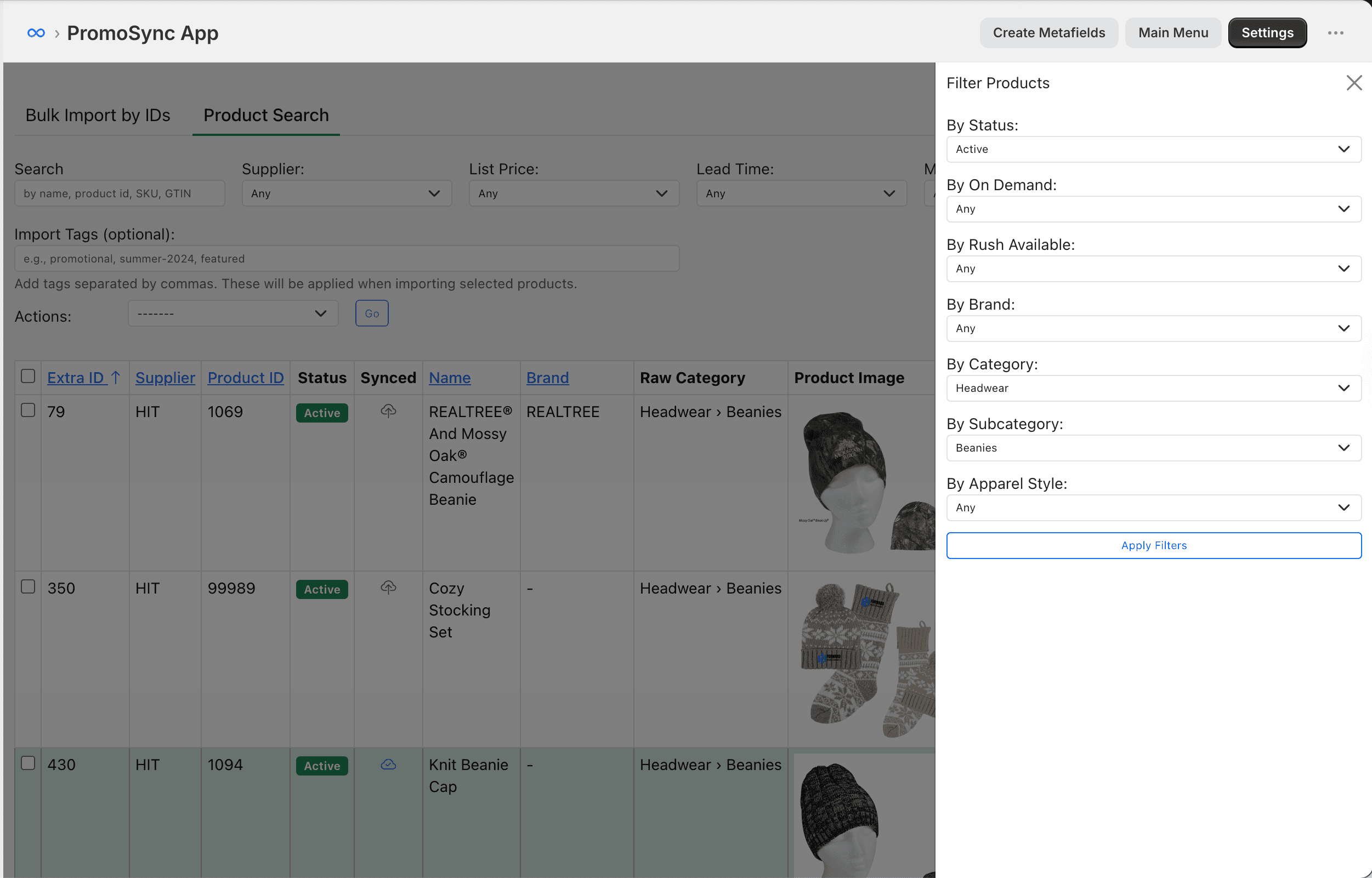
Wired Into PromoSync Product Search
PromoSync hits the same endpoint from the Shopify app side, but with a couple of small wrinkles worth flagging because they came up in code review:
- Two-step cascade, HTMX-driven. Picking a category triggers an
hx-getagainst a server-rendered subcategory<select>. The payload only forwards the more specific id (subcategory if set, otherwise the parent category), which keeps the URL clean and matches the API’s “subcategory wins” rule. - Per-shop 6-hour cache. PromoSync caches the full taxonomy per shop because every search page render needs it. Six hours is plenty. The taxonomy moves at the speed of YAML edits.
- Read ids from raw query data, not the form. Django form fields validate against the queryset they were built with at request time. If the cached taxonomy is one revision behind the database, the form would silently drop the filter on submit. The dropdown would show the choice, but the search would ignore it. We mirror our brand-filter pattern instead: pull the id directly out of
request.GETfor the actual query, and use the form only for rendering. Fewer surprises.
Why This Matters
Three things, in order of how much your team will feel them:
- Sales reps stop translating. “Polos” means polos. The supplier doesn’t get to override that on the search page.
- Cross-supplier filtering is a single dropdown, not a join. The same category id works whether you have credentials for one supplier or fifty.
- AI classification is reproducible. The taxonomy is plain YAML, the classifier reads from the same database the API serves, and the suggestion queue means a low-confidence label gets a human look before it ships. No black-box magic. Edit the tree, rerun the classifier, ship.
If you’re already on PSRESTful, the new “By Category” filter is live in Product Search . If you’re integrating against the API directly, hit GET /extra/v2/normalized-categories and start filtering products by normalized_category_id or normalized_subcategory_id. Full schema is on docs.psrestful.com . Not on PSRESTful yet? Get in touch and we’ll get you set up.