Reports & Insights: 15 New Ways to See What Your PromoSync Store Is Really Doing
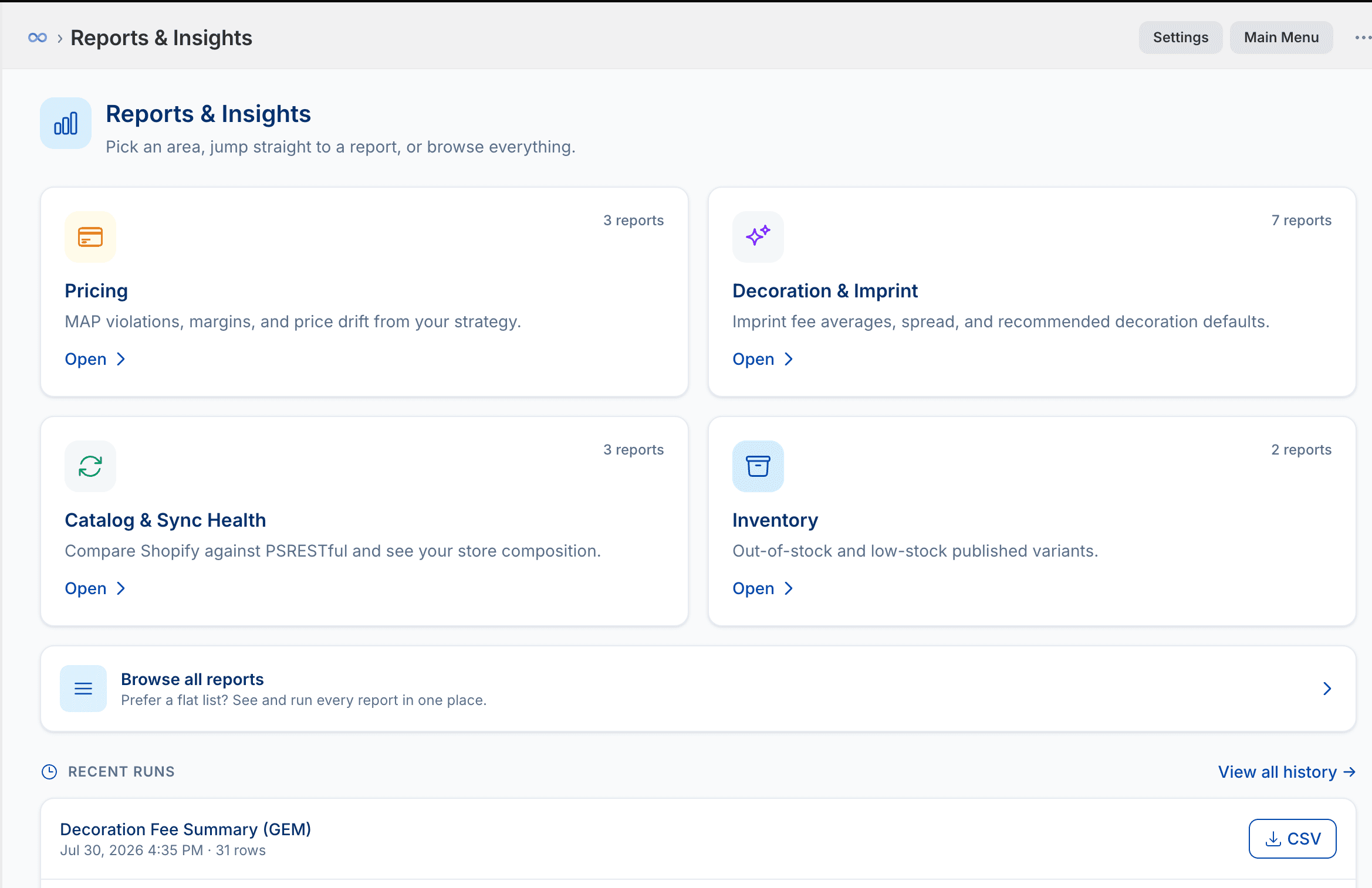
Syncing PromoStandards suppliers into Shopify is the job PromoSync has always done. But once thousands of products are flowing in, a harder question shows up: is the data actually right? Are any variants priced below MAP? Did a supplier discontinue parts you’re still showing? Which imprint fee should you default to when a supplier ships no decoration data at all?
Those questions used to mean exporting a Shopify CSV, exporting supplier data from PSRESTful , and reconciling the two by hand in a spreadsheet. So we built the reconciliation into the app. Meet Reports & Insights, a new hub with 15 reports across four areas, each one runnable in a click and delivered to your inbox with a CSV attached.
How it works
The hub is organized into four categories: Pricing, Decoration & Imprint, Catalog & Sync Health, and Inventory. Pick an area to see its reports, jump straight to one you run often, or hit Browse all reports for a flat list of everything in one place.
Every report follows the same simple flow:
- Pick a report and (if it asks) a supplier. Some reports run store-wide; others want you to choose which supplier to check. A few expose a tunable knob, such as a margin threshold, a low-stock level, or a “days stale” cutoff.
- Run it. Reports run in the background, so a big catalog scan never blocks your admin. You get a “we’ll email you when it’s ready” toast and can keep working.
- Read the summary, download the CSV. When it finishes, PromoSync emails your notification contacts a headline summary (products checked, issues found) with the full row-by-row CSV attached. Every run is also saved to Recent Runs / history, so you can re-download a past result or compare this week to last.
Because the whole thing is background-driven and email-delivered, “audit my catalog” stops being an afternoon in a spreadsheet and becomes something you kick off between two other tasks.
Here’s what each category gives you.
Pricing: MAP, margins, and drift from your strategy
Three reports that check what your storefront is actually charging against what it should be charging.
- MAP Violations. Scans your live Shopify prices against SanMar’s Minimum Advertised Price and flags every variant priced below it, listing the part, color, size, your price, the MAP, and exactly how far below you are. MAP enforcement is a real compliance risk, and this turns it into a one-click check. (Available once your SanMar credentials are connected and you have SanMar products synced.)
- Price Drift. Recomputes what each variant’s price would be under your current pricing strategy right now (the same logic your price sync uses), and flags any variant whose live Shopify price has drifted away from it. That’s how you catch a manual price edit someone forgot about, a stale price from before a supplier cost change, or a variant your strategy would now price differently.
- Low / Negative Margin. Compares each variant’s live selling price against its current supplier cost and flags anything selling below a margin threshold you set (default 20%), calling out negative-margin variants explicitly. It’s the report that catches the item you’re quietly losing money on.
Price Drift and Low / Negative Margin both re-derive prices through the exact same engine that powers PromoSync’s price sync, so what the report says matches what a sync would do, no guessing.
Decoration & Imprint: turn real supplier data into your defaults
This is the deepest category, with seven reports, and it solves a problem every distributor hits: many apparel suppliers (SanMar, S&S, and most blanks) ship no decoration pricing at all, so you have to decide your own setup and run charges. Instead of guessing, these reports mine the imprint fees that do exist across the catalog and hand you data-backed defaults.
- Decoration Fee Summary, the flagship. For each imprint method and charge kind (setup fee, run charge, extra-color and extra-location charges, PMS match, and more), it computes the most common fee, coverage %, weighted average, median, and min/max, in both list and net. This is the report shown as “Decoration Fee Summary (GEM)” in the screenshot above, where the
(GEM)is just the supplier code you ran it for, not a different report. - Fee Distribution, the full spread behind that summary: every distinct fee value for a method, its product count, share %, and cumulative %, so you can see whether one default is safe or the fees are all over the map.
- Recommended Defaults takes the recommended fee per method and diffs it against what you’ve actually pinned in your Decoration Defaults, tagging each as matches, differs, not set, or configured but not in catalog. It’s a direct “here’s where your configured defaults disagree with reality” list.
- Fee Outliers flags charges sitting far above a method’s typical fee (default 2× the mode), so a surprise $95 setup among a field of $50s doesn’t slip into your pricing.
- Method Availability & Alias Map: which decoration methods a supplier offers, with product counts, the fee kinds each supports, and the alias names that normalize to each method (so you can see that “silkscreen” and friends all roll up to Screen Print).
- Cross-Supplier Fee Comparison: the same method’s setup/run fees laid out side by side across your suppliers, one column per supplier, so you can see who’s expensive on embroidery versus screen print at a glance.
- Decoration Fee Coverage, a store-side view: which decoration-fee products actually exist in your Shopify store, by charge kind, and which suppliers they cover.
Together they take the single hardest thing to price in this industry, decoration, and give you numbers to stand on.
Catalog & Sync Health: reconcile Shopify against PSRESTful
Three reports that compare your live Shopify store against what PSRESTful reports from the supplier, so the two never quietly drift apart.
- Catalog Discrepancies. The reconciliation report. For a supplier, it reads your live Shopify variants and compares them part-by-part against the supplier’s current parts in PSRESTful, splitting the differences two ways: in Shopify but not in PSRESTful (parts that were discontinued or removed upstream and you’re still showing) and in PSRESTful but not in Shopify (new variants you could add). It’s the single best way to keep a large synced catalog honest, and it’s smart enough to note when a supplier uses part-ID mapping or configurable products so you don’t chase false positives.
- Supplier Breakdown. A full-store composition scan: how many products come from each supplier, how many are decoration-fee products, and how many are orphans with no supplier code at all. If you’ve ever wondered “what’s actually in my store and where did it come from,” this is the answer, with the orphan count being the number that usually surprises people.
- Unmarked Discontinued. Finds products PSRESTful now reports as discontinued whose stored status metafield in Shopify hasn’t caught up. That’s the exact gap that stops your storefront’s “Discontinued” handling from firing. These are the products a customer can still find and try to buy that no longer exist upstream.
Inventory: catch the variants that are visible but unbuyable
- Out of Stock & Low Stock. Scans your published, active variants and flags anything out of stock or running below a threshold you set (default 5). The point is the intersection that hurts: a variant that’s visible on your storefront but can’t actually ship.
- Stale Stock. A subtler one. It finds published, tracked variants whose stock quantity hasn’t refreshed in more than N days (default 14) because nothing is keeping it current: CSV or manually-added products, or PromoSync products on an on-demand shop that isn’t syncing on a schedule. It reads the true freshness timestamp (the last time the inventory level changed, not when the item was imported), and reports your last sync’s age alongside, so you know whether the number on your storefront can still be trusted.
Why this matters
PromoSync already had the two sides of the equation: your live Shopify store on one side, and normalized PromoStandards data from PSRESTful on the other. Reports & Insights is what happens when you point them at each other on purpose: MAP and margin checks that use your real pricing engine, decoration defaults mined from real catalog fees, a variant-level diff between Shopify and PSRESTful, and inventory checks scoped to exactly the variants a customer can see.
None of it requires an export, a spreadsheet, or a second tool. Pick a report, run it, and read the email.
Try it
If you’re already on PromoSync, Reports & Insights is live now. Open the app in your Shopify admin and look for Reports & Insights in the main menu. Start with Supplier Breakdown to see your whole store at a glance, then run Catalog Discrepancies for your biggest supplier and Decoration Fee Summary to pressure-test your imprint defaults.
Not on PromoSync yet? The three-step onboarding wizard is the fastest way to get a store synced and see the reports run against real data, and the PromoSync docs cover the rest. As always, feedback goes to our contact form .